
Google reCAPTCHA Migration – At a Glance
Google reCAPTCHA migration is
required and inevitable.
All Google reCAPTCHA keys must be manually moved to the Google Cloud Console by the end of 2025.
Classic reCAPTCHA version will be replaced.
The old reCAPTCHA Admin console will be replaced by reCAPTCHA enterprise features under Google Cloud.
Risks of reCAPTCHA migration.
As the migration into Google’s ecosystem becomes tighter, changes are to be expected in pricing, setup, complexity, and above all data privacy.
Don’t migrate reCAPTCHA – re-evaluate!
The obligatory migration of reCAPTCHA is a chance to replace reCAPTCHA with a privacy-first, independent alternative like Friendly Captcha. Try out now ›
Google reCAPTCHA migration in 2025 is bringing major changes that every website owner should know about. After updating its reCAPTCHA pricing model earlier this year, Google has announced that all reCAPTCHA keys must be migrated to a Google Cloud project by the end of 2025. At the same time, the classic version of reCAPTCHA will be absorbed into reCAPTCHA Enterprise.
According to Google, this migration aims to simplify its technology stack, improve compliance, and make advanced reCAPTCHA enterprise features available to more users. However, we can balance that:
- Compliance for Google Enterprise customers was never and won’t be ever guaranteed – at least for EU customers, since GDPR compliance for Google reCAPTCHA is more than questionable.
- Google reCAPTCHA Enterprise features always come with additional, high costs.
- Google Cloud Console backend is not intuitive and still intended for IT experts and teams.
To rule out all eventualities, developers and site administrators will need to manually complete the migration and understand how it may affect pricing, setup, and data privacy.
In this article, we’ll walk you through the step-by-step Google reCAPTCHA migration process, explain the key changes and limitations, and discuss whether this transition might be the right time to explore and install a simpler, more compliant CAPTCHA alternative.
Google reCAPTCHA Migration 2025 Explained: Full Integration With Google Cloud
Migrating Google reCAPTCHA to Google Cloud is supposed to give users access to enterprise-grade bot protection and fraud prevention features. It means users might be eligible to and to acquire Account Defender, SMS Defense, and Multi-Factor Authentication (MFA). The platform is also expected to provide analytics through dashboards and integrations with Cloud Monitoring and Looker.
Say goodbye to the classic reCAPTCHA Admin console. From now on, reCAPTCHA will be administered, configured, and managed entirely through the Google Cloud console. Within this console, you can create a Google Cloud project to manage your reCAPTCHA service.
Starting in Q4 2025, existing classic reCAPTCHA keys can be migrated automatically if you opt in, even if manual migration is strongly recommended for enterprises customers. You’ll still be able to access the old Admin console to view historical data and legacy configurations, but any new key management or configuration changes must be done in the Google Cloud console.
Google reCAPTCHA Migration Step-by-Step
For enterprise purposes and infrastructure, manual reCAPTCHA migration and integration is recommended.
Migration Using reCAPTCHA Admin Console
If you already have your reCAPTCHA key within the reCAPTCHA Admin console, you will need to:
- Log into your reCAPTCHA Admin console,
- Select your project,
- Select the keys you want to migrate,
- Submit.
Google Cloud Console should opens with project and the keys as information.
Migration Using Google Cloud Console
This supposes you already have registered to Google Cloud or created a Google Cloud project. If it is no the case already, go to our section “Get familiar with Google Cloud console” to get more details.
1. Check Your Permissions.
You need to be listed as an owner of the site key in the reCAPTCHA Admin console. Alternatively, you have one of these IAM roles in Google Cloud: project owner, project editor, or reCAPTCHA admin. If you don’t have one of these roles, you should require your system administrator to grand access.
2. Migrate Your reCAPTCHA Classic Keys.
- Go to reCAPTCHA Page in Google Cloud console.
- Select the correct Google Cloud project.

- Find the reCAPTCHA Classic key to migrate. For this, go to the Classic keys section, identify the key you want to migrate, click on “Upgrade key”, and confirm.
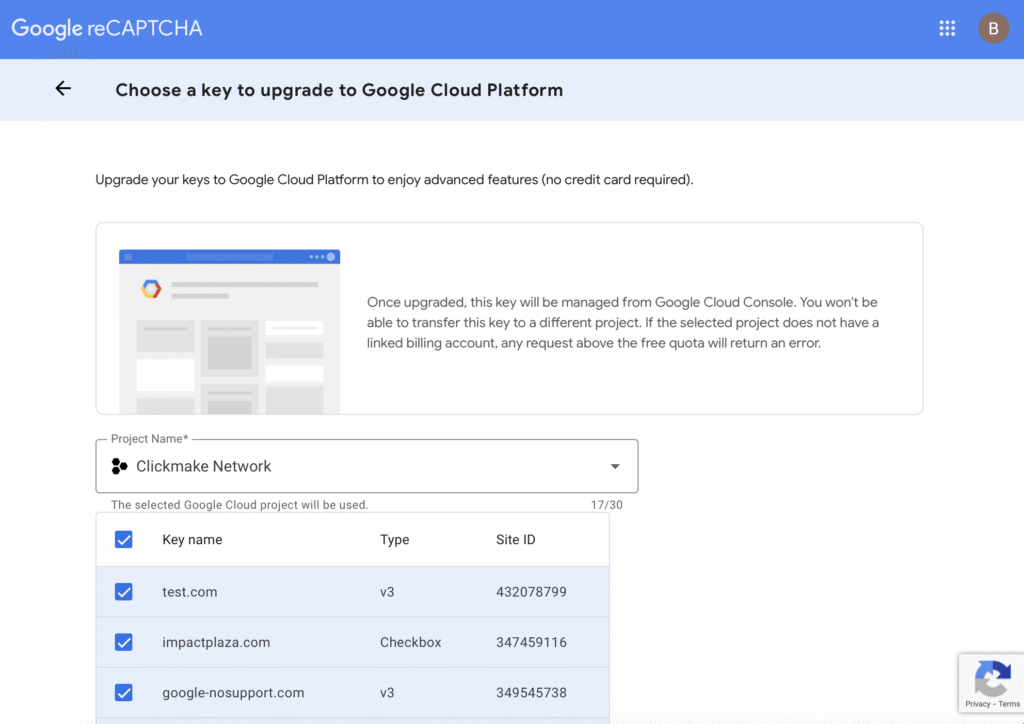
3. Verify!
Your migrated key should now appear under “reCAPTCHA keys” in your Google Cloud console.
- Go to the reCAPTCHA page.
- Look for your migrated key in the reCAPTCHA key section (not the classic key section!).
Here another point: Do not delete your Classic key from the reCAPTCHA Admin console or Google Cloud Console. If you do so, it will be removed from both platforms and your site will lose its reCAPTCHA bot protection.
Get Familiar With Google Cloud Armor To Set Up reCAPTCHA
Google has moved reCAPTCHA management to Google Cloud Console (GCC), so you firstly need to create a Google cloud console account if you still don’t have one.
- Sign in using your Google account.
- Create a new project if you don’t have one yet.
- Create your billing profile. You can use a credit card or an exisiting Google Cloud project billing ID.
- Enable billing.
Eventually, you will be able to enable reCAPTCHA on websites in the Google Cloud Console on the reCAPTCHA Enterprise API Page.
Rethinking Google reCAPTCHA: Time For a Change?
Otherwise noted the content, Google reCAPTCHA prompts its customers to migrate their keys to the Google Cloud Console.
At first glance, it might look like a minor operational update. In practice, it’s yet another enforced move within Google’s expanding Cloud ecosystem. And as many teams have noticed, reCAPTCHA has long shown its limits – from usability friction to rising and unpredictable pricing earlier this year.
But beneath the surface, this migration points to something larger: the deeper integration of reCAPTCHA into Google Cloud’s architecture. That raises a bigger question for engineering and security teams alike: Does this ecosystem still serve your long-term technical, compliance and overall business needs?
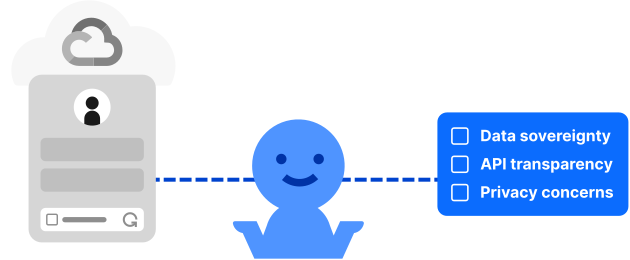
Concerns around data sovereignty, API transparency, and third-party data sharing are becoming increasingly relevant in the context of GDPR, CCPA and other international privacy laws.
Through this migration, the security tool that was previously only available to businesses will become a building block in the vast Google cosmos. This development will surely reinforce the data and privacy concerns that have been discussed over the last two decades when it comes to Google.
It’s time to look toward lighter, privacy-first reCAPTCHA alternatives that can be deployed independently, maintained easily, and integrated seamlessly with existing tech stacks and without refining site specific model.
In short, what appears to be a simple migration may well be the right moment to re-evaluate how your organization handles user verification – and who ultimately controls the data that comes with it.
Time to Explore Modern CAPTCHA Alternatives
Friendly Captcha is the top alternative to Google reCAPTCHA. It overcomes the pitfalls of Google reCAPTCHA in terms of accessibility, privacy, and ease of use.
- Privacy-first and GDPR, CCPA-compliant: Friendly Captcha does not use HTTP cookies or tracking to work, so no consent is required.
- Top accessible CAPTCHA service: Friendly Captcha works invisibly as it uses proof-of-work mechanism. This means users do not need to execute any manual action with puzzles, labeling images or checking boxes. Friendly Captcha is by design fully accessible and occurs no frustration.
- Easy to install, easy of use: Friendly Captcha can be integrated into almost any system or application. Check our integration page.
- Support is included to assist you with all your requests.
You can try Friendly Captcha for free for 30-days – this way. If you are an enterprise, get in touch with our team.
Final Thoughts: Don’t Just Migrate – Re-evaluate
The 2025 Google reCAPTCHA migration isn’t just another admin task. It’s a reminder to look closer at how your verification tools impact performance, privacy, and long-term flexibility.
Yes, moving to Google Cloud brings tighter integration and new enterprise features. But it also adds dependencies, complexity, and hidden cost shifts.
If your priority is transparency, control, and user experience, this may be the perfect moment to explore lighter, privacy-first reCAPTCHA alternatives like Friendly Captcha – designed to protect your site without tracking or friction.
Don’t just follow the Google reCAPTCHA migration path – use it as a chance to future-proof your security stack.
FAQ
Manual migration of reCAPTCHA to Google Cloud is recommended because it grants you control over your settings and visibility into your billing and access to advanced features. You can choose an existing Google Cloud project to house your reCAPTCHA keys, or create a new one. This ensures that your resources are organized logically. If you wait for automatic migration, Google may assign your keys to an unwanted, newly created project, which will make future management difficult. If your website has more than 10,000 assessments per month, set up a billing account before migrating. This prevents potential service disruptions that could occur if your usage exceeds the free limit in a project.
You can avoid a manual reCAPTCHA migration to Google Cloud console by choosing a lightweighted CAPTCHA alternative like Friendly Captcha.
The primary risks of manually migrating Google reCAPTCHA keys to a Google Cloud (GC) project include service disruption, unexpected billing charges, increased security vulnerabilities, and legal and compliance issues if done incorrectly. There are on the market other reCAPTCHA alternatives that don’t come with all those risks, such as Friendly Captcha.
If you do not complete the migration process correctly or before Google’s mandated deadline, your reCAPTCHA service may stop functioning. This could prevent legitimate users from accessing forms or services on your website. An incorrectly migrated or non-functional reCAPTCHA exposes your website to a significant increase in spam, bot attacks, and other forms of abuse because the protection layer is compromised. Finally, the free tier of reCAPTCHA Enterprise is 10,000 assessments per month. Usage beyond that requires enabling billing on your Google Cloud project. If you exceed the free limit and are not prepared for this, reCAPTCHA requests may start failing, causing errors on your site.
Yes, you need to migrate your reCAPTCHA keys from the old service to Google Cloud. You can migrate your keys manually or automatically until the end of 2025, otherwise your mobile applications will be vulnerable to bot spams and attacks as your CAPTCHA won’t be working anymore. Except as otherwise noted, consider that migration can pose potential challenges, as it requires to be familiar with IAM roles and other Google Cloud services, which could be challenging if you are not already using them. Find in Friendly Captcha a secure reCAPTCHA alternative for your mobile applications.
Google reCAPTCHA is a security service developed by Google that helps protect websites and web applications from spam, bots, and automated threats. It uses behavioral risk analysis and visual challenge tests to distinguish human users from automated scripts.
Originally based on traditional CAPTCHA puzzles, reCAPTCHA has evolved into a more seamless verification system. Websites integrate it through an API key, allowing Google’s system to analyze user behavior and confirm legitimate interactions.
Over the years, Google has released several versions of reCAPTCHA:
- reCAPTCHA v2 introduced the well-known “I’m not a robot” checkbox and visual image tests.
- reCAPTCHA v3 replaced manual tests with a background risk score based on user interactions and data analysis, reducing friction for real users.
- Invisible reCAPTCHA runs automatically without visible challenges, further improving usability.
- reCAPTCHA Enterprise offers enhanced security and analytics features designed for businesses.
If you’d like to explore this topic further – including the accessibility and privacy implications of each version, check out our comparative guide to Google reCAPTCHA v2 vs. v3, and discover all our Google reCAPTCHA resources here.
 English
  German
  French
  Spanish
  Italian
  Portuguese